Making a Sound Effects List
- Make a list of all the sound effects, then these are to be recorded or obtain. Choose a soundproofed room to record in and find decent microphone to record the audio. Then, when editing, remove existing audio and unlink audio from video. Then delete any unwanted clips and add the ambience track or sound bed. Collect a series of background noises in the original audio and lower the volume to barely audible, then the sound effects need to be layered.
Automated Dialogue Replacement
The dialogue that is going to be replaced needs to be written down, then multiple versions of this audio needs to be recorded. The video should be used for reference if possible.
Creating Foley
Similar to ADR, write down the exact sounds to be replaced and record multiple versions and use the video for reference.
Finding existing Foley
Write down the exact sound to be replaced, then original royalty free or copyright fee versions can be found and the SFX needs to be downloaded into a folder with the footage.
Music Soundtrack
a music track can be added at the end of the process, however only if the music will fit the scene, if not, music being used should be avoided, especially if the song is copyrighted, because it can be very expensive to buy a song. If this is not the case, copyright free music can be used.
Sound-bridging L and J cuts
L cut– when the audio from previous scene carries on into the next
J cut– when audio from upcoming scene starts in the previous scene
To sound bridge L and J cuts, unlink the audio and shorten either the video or the audio, depending on what type of cut is desired. The audio will now bridge the new video.
Mixing the audio
- Use the sound scope to the right of the timeline.
- Ambience should be barely audible.
- Dialogue should be in the green/ yellow.
- Background Foley should be in the green/yellow.
- Key Foley should be in yellow.
Foley Set-up
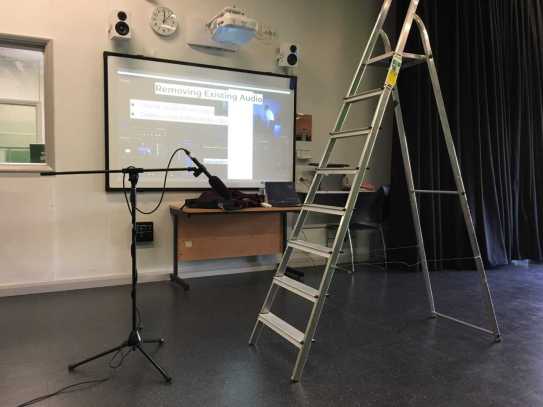
In class, we attempted Foley by using a shotgun microphone and a ladder. We used the ladder to create some audio. This gave us a taster of what creating Foley sound effects is like. Even though it can be quite enjoyable, it takes a lot of time, effort and editing. Therefore, in my own work, to save more time, I would focus more on gathering royalty free/ copyright free sound effects online.

 Akira's Media Blog