Today I am aiming to experiment with abstract camera angles such as worms eye view and birds eye, which are both angles I have not used in my work before. This is because I want to practice and get an idea of what it is like to film from these angles as it is important for my group and I to know what specific positions the camera needs to be in, in order to achieve the angles. Also, I want to experiment with the green screen in the studio to see what it would actually look like if we were to use it in the FMP. This is to ensure that it will come out the way I expect, instead of it looking tacky.
I will carry out these experiments in the studio by using the green screen that is already on site. To ensure I am carrying out these techniques correctly, I will ask for assistance from the technician, so that when it comes to editing this footage, I will know how to make look as professional as I can. In regards to the camera angles, I aim to film a subject from different perspectives to see what these look like.
We do not aim use a specific tutorial, we will mainly ask our technician for help so that we can clarify everything there and then. If there is something that the technician is unclear on, then we will research further into it through watching tutorials.
The Green Screen:
The Practical Process-
Firstly, we headed to the studio and decided that we wanted to test out the green screen. We collected a camera, tripod and an SD card. We ensured to ask the technician to help us set up the lighting properly in order to get the full effect of the green screen. He told us to ensure that we set up the lights around the subject so that their shadow could not be seen at all, as this does not portray the reality of using a green screen if the shadow is seen.
I personally had the idea of creating a ‘dream world’, as we have the idea of using abstract and supernatural elements within our FMP. Therefore, I did not want to use it for realistic purposes, but in fact the opposite, therefore this was not something I was worried about. However, we carried on with this experiment and ensured that everything was done in the right order anyway.
We used a member of our group as the subject and we directed her to stand within the middle of the set that we created. We then just asked her to carry out simple actions, such as, jumping up and down so that it looks like she is falling, or even just standing still, so that we could experiment the best that we could.
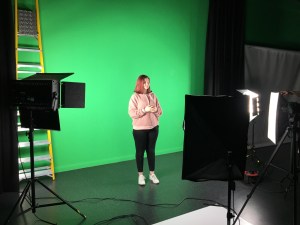
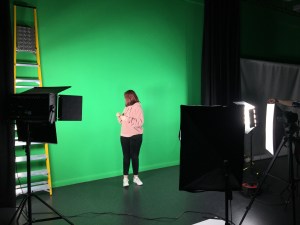
In regards to the lighting, we used high-key lighting at the front and low-key lighting on either side of the camera to illuminate her shadow.
The Editing Process
When editing the footage of the green screen, we simply downloaded footage of clouds and used as the main background for the green screen, just so that we could get a rough idea of what using the green screen would be like.
The editing process of this appeared to be surprisingly easy as all that needs to be done is to import the background to replace the green screen, import the main video of the subject, then proceed to go to video effects, click the ‘keying’ tab and choose ‘ultra keying’, then use the drop tool and click the green on the video, this will then make the video transparent and it will just be the subject in front of the desired background.
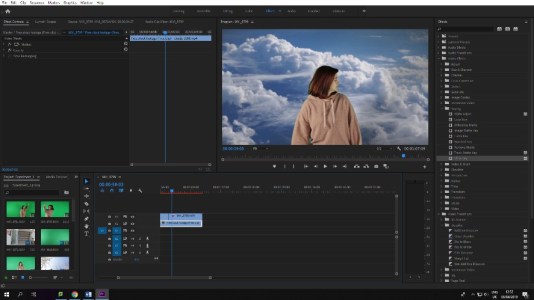
Evaluation of the Green Screen
After editing the green screen footage, it came out quite successfully, however I do not know if I still plan to use it in the FMP as I do not think it will be necessary. I noticed that it was difficult to completely block out the subjects shadow and it ended up showing on the screen while editing, meaning that it did not look completely professional. Therefore, I think it would be better if we just exclude the green screen from the FMP as this would not reflect what we truly want to do with our work.
Testing out Different Camera Angles
After shooting with the green screen, we decided to experiment with some different camera angles. Originally we were only aiming to experiment with worms and birds eye view, but we ended up doing a few more. We decided to get some shots outside as we don’t plan on filming in the studio that often for the FMP anyway, therefore we wanted to remain realistic with how we will be filming scenes for the FMP.
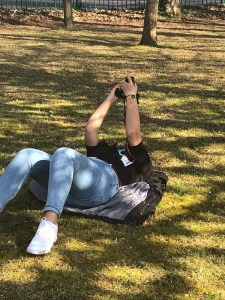
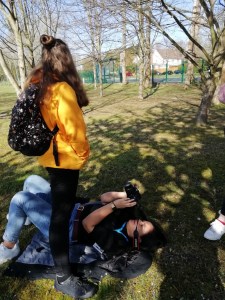
When we went outside, worms eye was the first shot we focussed on getting. To fully get a worms eye shot, I laid on my back and held the camera upright, which was the best way to achieve this. This was not the only way I took these pictures, as I also aimed to take some tilted worms eye shots too. I believe that these shots came out quite well and I could see the uniqueness of this shot, which is something I definitely aim to do.
When doing the birds eye view, we took a shot of the subject walking down the stairs. This was a quick shot which wasn’t hard to do, however, that was only in that specific scenario, without a drone, birds eye view is very hard to obtain when in normal surroundings with no higher platform to capture the shots. Therefore, if there is an opportunity to use birds eye view, I would take it, but only in more accessible areas where creating a birds eye view is possible.
The next shot we obtained was a Dutch tilt. We created this by getting a subject to walk outside of a fence, the fence being in front of the shot. This definitely came out the way that we were expecting, which is a positive as this is an angle we want to use in our project, seeing as we want our genre/theme to make people feel unsettled.
Another shot we tried using was a POV, handheld shot, which was something we were not planning on doing, however after doing, we are seriously considering using for our FMP, as we have come up with an idea so make some scenes in the project have handheld footage. This creates something unsettling and unknown to the viewer which it’s important to use.
The Editing Process
Editing these clips together gave me an idea of what it would be like to edit these types of shots for our FMP and I think editing can be a lot more smoother and easier if there are a variety of shots that can be edited from.
In each clip, I labelled each one so that anyone viewing will know which type of of shot it is. 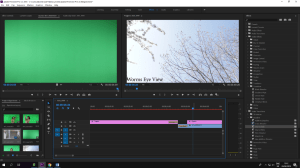
In regards to the colour grading, I mainly boosted the vibrancy, saturation and the sharpen, as this made our footage more aesthetically pleasing and it brought out the colours in the shots. 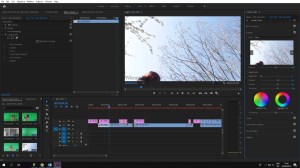 When adjusting the curves, I lowered the white level, as most of our scenes were quite bright, so by doing this, it once again brings out other colours in the scenes more effectively.
Evaluation of different camera angles:
I believe that experimenting with the different angles and shots today and definitely helped my group and I understand that a variety and angles will give us a better chance to keep the audience intrigued in our project. Furthermore, some of these shots are quite easily attainable yet they can have the biggest effect on the viewers, which is important.

 Akira's Media Blog