These are the targets I need to achieve within the next two weeks. Firstly, I need to complete two textual analyses of two media products, one that will be set for me and one of my own choice. Within these analysis’s, I need to focus on MACRO and MICRO elements, which I will attempt to complete on 13/04. I need to focus on internet research in order to gather all of the information for my work. I also need to complete my blog post on the interview our class conducted with two former college students who gave us advice on our FMPs which I will complete today, 5/04.
Another piece of work I need to complete is my questionnaire analysis which I will complete next week, 11/04.
After I complete all of this, I will write a post on what I have to do next.
Today I am aiming to experiment with abstract camera angles such as worms eye view and birds eye, which are both angles I have not used in my work before. This is because I want to practice and get an idea of what it is like to film from these angles as it is important for my group and I to know what specific positions the camera needs to be in, in order to achieve the angles. Also, I want to experiment with the green screen in the studio to see what it would actually look like if we were to use it in the FMP. This is to ensure that it will come out the way I expect, instead of it looking tacky.
I will carry out these experiments in the studio by using the green screen that is already on site. To ensure I am carrying out these techniques correctly, I will ask for assistance from the technician, so that when it comes to editing this footage, I will know how to make look as professional as I can. In regards to the camera angles, I aim to film a subject from different perspectives to see what these look like.
We do not aim use a specific tutorial, we will mainly ask our technician for help so that we can clarify everything there and then. If there is something that the technician is unclear on, then we will research further into it through watching tutorials.
The Green Screen:
The Practical Process-
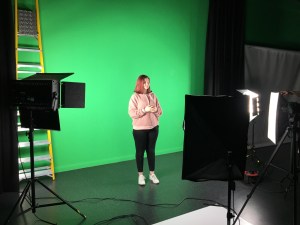
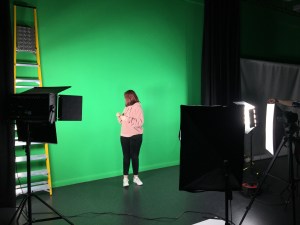
Firstly, we headed to the studio and decided that we wanted to test out the green screen. We collected a camera, tripod and an SD card. We ensured to ask the technician to help us set up the lighting properly in order to get the full effect of the green screen. He told us to ensure that we set up the lights around the subject so that their shadow could not be seen at all, as this does not portray the reality of using a green screen if the shadow is seen.
I personally had the idea of creating a ‘dream world’, as we have the idea of using abstract and supernatural elements within our FMP. Therefore, I did not want to use it for realistic purposes, but in fact the opposite, therefore this was not something I was worried about. However, we carried on with this experiment and ensured that everything was done in the right order anyway.
We used a member of our group as the subject and we directed her to stand within the middle of the set that we created. We then just asked her to carry out simple actions, such as, jumping up and down so that it looks like she is falling, or even just standing still, so that we could experiment the best that we could.
In regards to the lighting, we used high-key lighting at the front and low-key lighting on either side of the camera to illuminate her shadow.
The Editing Process
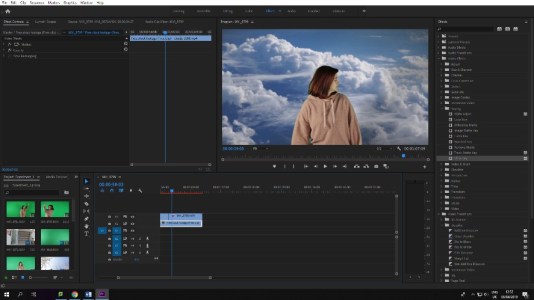
When editing the footage of the green screen, we simply downloaded footage of clouds and used as the main background for the green screen, just so that we could get a rough idea of what using the green screen would be like.
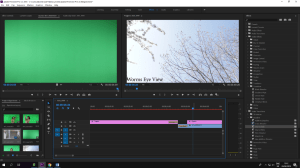
The editing process of this appeared to be surprisingly easy as all that needs to be done is to import the background to replace the green screen, import the main video of the subject, then proceed to go to video effects, click the ‘keying’ tab and choose ‘ultra keying’, then use the drop tool and click the green on the video, this will then make the video transparent and it will just be the subject in front of the desired background.
Evaluation of the Green Screen
After editing the green screen footage, it came out quite successfully, however I do not know if I still plan to use it in the FMP as I do not think it will be necessary. I noticed that it was difficult to completely block out the subjects shadow and it ended up showing on the screen while editing, meaning that it did not look completely professional. Therefore, I think it would be better if we just exclude the green screen from the FMP as this would not reflect what we truly want to do with our work.
Testing out Different Camera Angles
After shooting with the green screen, we decided to experiment with some different camera angles. Originally we were only aiming to experiment with worms and birds eye view, but we ended up doing a few more. We decided to get some shots outside as we don’t plan on filming in the studio that often for the FMP anyway, therefore we wanted to remain realistic with how we will be filming scenes for the FMP.
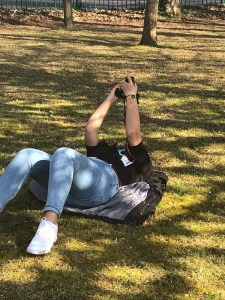
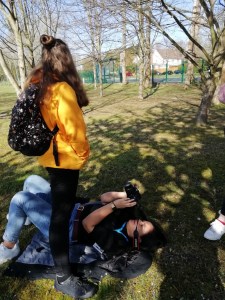
When we went outside, worms eye was the first shot we focussed on getting. To fully get a worms eye shot, I laid on my back and held the camera upright, which was the best way to achieve this. This was not the only way I took these pictures, as I also aimed to take some tilted worms eye shots too. I believe that these shots came out quite well and I could see the uniqueness of this shot, which is something I definitely aim to do.
When doing the birds eye view, we took a shot of the subject walking down the stairs. This was a quick shot which wasn’t hard to do, however, that was only in that specific scenario, without a drone, birds eye view is very hard to obtain when in normal surroundings with no higher platform to capture the shots. Therefore, if there is an opportunity to use birds eye view, I would take it, but only in more accessible areas where creating a birds eye view is possible.
The next shot we obtained was a Dutch tilt. We created this by getting a subject to walk outside of a fence, the fence being in front of the shot. This definitely came out the way that we were expecting, which is a positive as this is an angle we want to use in our project, seeing as we want our genre/theme to make people feel unsettled.
Another shot we tried using was a POV, handheld shot, which was something we were not planning on doing, however after doing, we are seriously considering using for our FMP, as we have come up with an idea so make some scenes in the project have handheld footage. This creates something unsettling and unknown to the viewer which it’s important to use.
The Editing Process
Editing these clips together gave me an idea of what it would be like to edit these types of shots for our FMP and I think editing can be a lot more smoother and easier if there are a variety of shots that can be edited from.
In each clip, I labelled each one so that anyone viewing will know which type of of shot it is.
In regards to the colour grading, I mainly boosted the vibrancy, saturation and the sharpen, as this made our footage more aesthetically pleasing and it brought out the colours in the shots. When adjusting the curves, I lowered the white level, as most of our scenes were quite bright, so by doing this, it once again brings out other colours in the scenes more effectively.
Evaluation of different camera angles:
I believe that experimenting with the different angles and shots today and definitely helped my group and I understand that a variety and angles will give us a better chance to keep the audience intrigued in our project. Furthermore, some of these shots are quite easily attainable yet they can have the biggest effect on the viewers, which is important.
Within this questionnaire, I am inquiring to find out what people would find interesting to vie in short films. Such as genres, themes, visuals styles, the age and gender of people watching short films, viewing platforms of the short film, the lengths of the short film, etc.
This is to help me generate more ideas for my final major project.
Capturing too much footage can be a pro and a cons, however the strengths can be a weakness because shooting too much footage leads the filmmakers not thinking very deeply about what they’re shooting, because they are capturing everything unnecessarily. Therefore, it is important to plan your shots ahead of time and think effectively about what you want to communicate to the audience through your images.
Take Your Time
Whenever getting a shot of some action and thinking that you have attained a suitable amount of footage, therefore you stop recording, it is important to keep rolling for at least another 10/20/30 seconds, as it will make things a lot easier when it comes to editing. Otherwise, you will regret editing a cut that needed to be recorded for just that few seconds longer.
Leave Headroom
Headroom is the space between the top of the frame and the top of the subject’s head. Having either too much or too little headroom will create an unbalanced composition, if there is too much it can cause the audience to feel unsettles or uneasy with a floating head aesthetic whereas too little can cause them to feel claustrophobic.
Don’t Over-Expose or Under-Expose
When filming outside, it is important to have additional lighting to put in front of the subjects and not use the sun as a backlight. Either the sky will be blown out or underexposing the subjects. If you do have lights, set them up in front of your subject so that there is a balanced exposure, if this is not possible, use the sun as the key light instead of the opposite.
Don’t Overdo the Zoom
Constant zooming in and out will it difficult for the audience to know what they’re exactly supposed to be looking at. If this is what you intend to do, do a nicely composed push and pull focus.
Mix Up the Angles
It’s always effective to attain a different perspective, especially when it comes to filming. Things are always being seen at eye-level therefore seeing this same type of shot can become boring. So, this can be fixed by shooting different angles, getting onto the ground (worm eye shots) or getting onto a ladder to get come high angle shots will be a great variation.
Stabilise for Smooth Footage
Stabilisers can help transform a shaky, footage into a professional piece of digital art. It makes the footage easier to watch and it will most likely make your footage look better. If you don’t have access to stabilisers, there are other ways to stabilise your camera, you could use a heavy tripod, snorricams, steadicams and generally avoiding handheld footage.
Story– tells a sequence of events. It is A, B, C and D, the set of relevant events that holds importance to others. They can be found in everyday life occurrences.
Plot– It describes sets of events as they relate to each other. It is concerned with selecting the events for its telling and the approach to that telling for max effect.
Narrative– It deals with how the events are told. The ordering of events into consumable format. It is their creativity shaping the entire project, making it significant to a specific audience.
The styling/congruence.
Elements of narrative
String of events occurring in space and time.
Connected by the logic of cause and event.
Psychologically motivated actions.
Ties together character traits, goals, obstacles.
It gives congruence.
Narrative forms
Linear– chronological, most common, simple and organised, avoids flashback and dreams, predictable/archetypical (most original sense of the problem), genre: children, factual, children, classic
Single strand– 1 set story-line, focuses on 1 person/ hero and their story, no groups/ teams, secondary characters allowed
Nonlinear– no specific order/ fractured/ altered, intensified/ create a sense of instability, whole truth is unknown, no chronological order/less linear, back and forth in time and or characters POV.
Multi strand– several story-lines, diff types of people, story focuses on each character’s individuals propose to the moral, goof for sequels, series, documentaries.
Framed Story lines– story within another, tale narrated by hero to other characters, audience might forget the initial story, genre: fantasy, fantastic drama, awareness, children, factual.
Circular- stories that end where they begin, hero returns home, denote np change (some stories), climax is the evolution/ end of adventure, genre: epic, fantasy, mythological
Theorists-
Aristotle’s- Dramatic Arc- 3 act narrative
Todorov– equilibrium– all is in order, normal life is carried out:
Disruption- of ordered state by an event
Recognition- that the disruption has taken place- conflict
Restoration- attempt to solve the conflict
New equilibrium- different from where the story began
PROPP– e.g. Harry Potter – Protagonist/ hero
Antagonist/ villain
Helper/ friend
Donor/support
Dispatcher/directs
False hero/ traitor
False villain/ martyr
Prince (princess)/ award
Father/ awarding
Vogler-Campbell– Hero’s Journey
Ordinary world
The call to adventure
Refusal of the call
Meeting with the mentor
Crossing the threshold
Tests, allies and enemies
Approach
Ordeal
Road back
Resurrection
Return with the elixir
Levi-Strauss
Oppositions can be visual or conceptual
Love/hate
Good/evil
Light/ darkness
Movement/ stillness
Control/ panic
Beauty/ ugliness
Law abiding/ criminal
Freedom/ imprisonment
Harmon-Story Cycles:
Character is in comfort zone
But they want something
They have to enter unfamiliar situation
They adapt to it
They get what was wanted
Heavy price to pay
Return to their familiar situation
The character has forever changed
Types of Narrative:
Realist– real life situation, audience relates, avoid boring/ repetitive, creativity limited, story has the most weight, speciality: dramas, audience knows as much as characters, they both learn together.
Anti Realist– set in non-realistic atmosphere, audience is presented with an alternative world, purely entertaining or awareness, heavily in imagination, chroma key, CGB and editing tools, speciality: fantasy, sci-fi, comedy.
Flashback– shows the past time, historical fiction, gives a purpose, shortens between events, explains/makes clear.
Dramatic Irony– audiences knows something that the characters do not, flanked by scenes in which audience learns something, sequenced by scenes in which characters finally learn what the audience has known.
Endings-
Cliffhanger- to be continued, intends to conceive a new story, last fragmented- high intensify occurrence, increase excitement about final product, intends to get further sponsorship, create interest in the follow up, genre: crime, drama, fantasy.
Open Ended- uncertain whether the hero achieved the goal or not, character has shown evolution, audience decides final fortune, used in two-part stories, genre:action,
Close Ended- traditional wrap-up, new equilibrium reached, everything has bee figured out, hero reaches goals, conflicts are sorted, genre: crime, fantasy and comedy, for example, Rocky.
Prophetic- leaded open ending, more certain, similar to cliffhanger (emotionally) but showing last scene that doom/fortune occurred during story might happen, genre: thriller, horror, comedy.
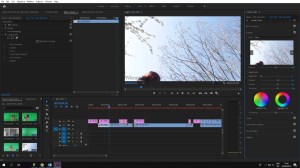 When adjusting the curves, I lowered the white level, as most of our scenes were quite bright, so by doing this, it once again brings out other colours in the scenes more effectively.
 Akira's Media Blog