Production Diary- Day 1- ‘Conspiracy’

Monday- 4th February 

Today we were given the task to create another 3-minute short film. All the audio/ Foley has to be recorded ourselves and the whole story line had to be created with just our own ideas, we were not given one to follow like we did in our previous project.

We struggled initially to come up with an idea for this short film as we were struggling with factors such as what genre we should go through with. Therefore, to help us come up with an idea, we created a mind map of what we did and didn’t want in this short film.

After an hour or so of trying to decide where wanted our story line to go, we finally came up with one and created a basic timeline for it in order to help us know the order in which the scenes were going to go in and where they would take place.

After coming up with the story line, we completed some more pre-production such as an equipment list, sound list, location reconnaissance, storyboard, risk assessment and a script. We gave each member of the group a certain piece of pre-production to do, so that we could get it done quicker in order for us to start filming as soon as we could.

Our short film takes place in college and follows the story of a student who is consumed by reading different conspiracy theories during a library study session. While reading many theories such as living in a simulation or mobile phones listening to their users, she almost starts to believe this. This begins to scare the student and she proceeds to leave the library and after she leaves, strange things begin to happen around her, which makes her being to question reality.

Evaluation- Late For College

 Evaluation- Late For College

While filming our short film, ‘Late For College’, our group tried to be as precise and accurate in regards to the script as possible. However, there were a few problems that interfered.

Firstly, only in editing did I realize that microphone picked up a lot of wind, instead of masking it. This is when we realized that the Zoom microphone should be mainly used for recording speech, not outside ambience noises. Therefore, we had to turn down the volume to ensure that the wind could not be heard. Furthermore, another way in which we fixed this was by adding some background music, which actually helped bring the overall atmosphere and vibe of the film together, which made this a positive factor of our short film. However, I have noted this; next time using a microphone that is covered, such as the Rhode microphone would be more ideal to use in order for my projects to reach their full potential.

Another problem that we encountered while filming was lighting of the most of the scenes were quite dark. For example, when we actually filmed inside the college or my house, the lighting in different areas could change quite drastically, going from dark to bright quite often. We tried to fix this during the process of filming by turning on the lights in my house, however it unfortunately did not make much of a difference. Therefore, during editing, I tried to fix this during the colouring and grading process as best I could, however it ended up looking grainy and of poor quality. Therefore, in order to improve next time, I will ensure I know how to use the camera settings such as the aperture properly, in order to let more lighting in or use a portable a light/ 3 point lighting to light up the subject.

Throughout this specific project, my peers in my group stated that I had a very directorial role throughout as I often pointed out certain things we should film or giving the actor ways in which she could act that would make the short film more effective. Furthermore, my peers continued to state that during editing, certain scenes were quite dark and that I needed to brighten up the scenes a bit more, which I tried to do however like stated before, this was due to our groups lack of knowledge on how to adjust the camera aperture properly, but camera knowledge is something I will continue to work on. In regards to the short film, my peers stated that it could’ve been a lot better, for example, they stated that the actress failed to portray the “rushing” aspect behind the film which made the film appear to be longer than it should. Additionally, the audio appeared to be lazy due the wind we caught in microphone, however in my own personal edit, I cancelled this out with royality free music which also helped making the film more “rushed”.

However, this project has many strengths including the fact that we stuck to the pre-production work that we produced. There were a few minor changes, however it all came to together well. I believe that the sequence flows well and the colouring fixed most of the scenes that were too dark. Furthermore, the ambience and soundtrack fit well with the video, which means that in conclusion, I am content with the work that I produced.


Production Diary- ‘Late For College’ Entry 1/02/19

Today I finalised the edit of the short film. I firstly focused on ensuring that all of the clips were in the correct order and that they where all cut to the right point so that the film flowed perfectly.

After this, I started ordering the sound bed together by adding sounds such as brushing teeth, walking up the stairs, keyboard typing sounds, etc. After doing this and ensuring that the sounds sounded natural, I attempted to add some L and J cuts. For example, I brought in some footsteps sounds before the actor left the kitchen to ensure that the sounds blended well together instead of the obvious sound of cuts.

After this, I colour graded  and corrected the the scenes, I added warmer tones and boosted the saturation to imply the fact that it is supposed to be morning. I also added widescreen bars to finalise the edit.


Production Diary- ‘Late For College’ Entry- 30/01/19

On Wednesday 30th January, we started editing our clips that we had recorded on Monday or Premiere Cut Pro.

Each member in the group started in their own edits.
I assembled all of the footage together and put everything in order to create a sequence, however I am yet to add the finishing touches such as the colour correcting and grading and adding some of the Foley sounds. So far the sequence seems to flow well, however the colouring in some scenes are a bit too dark, which is a problem we encountered while filming because of the lighting in certain areas.

Another problem that I have picked up during editing is that the microphone we used to record (a Zoom microphone) still picked up a fair amount of wind sounds, this is because it is more evident now that this microphone should be used for recording things such as speech, not necessarily outside ambience.
However, I have noted this and now know that for future projects, a Rhode microphone would be more ideal to use.
Besides these problems though, I am feeling confident with the work I have produced so far.

I also received some midway  feedback from my tutor, who told gave me some advice on what to do.


Production Diary- ‘Late For College’- Entry- 28/01/19

On Monday 28th January, our group starting filming our “Late For College Scenario”.
We decided to film all of the college-based scenes before the bedroom scenes as this made the most sense and was the easiest to do.
After finishing off some pre-production work, we left college and walked to an area in which we could film the actor running down a street, we chose a quiet street which was easy to film on as there were no cars passing and not a lot of background noise. We gathered multiple shots of this certain sequence, we had a scene of the actor running towards the camera, almost creating a contra-zoom effect, a shot of her running past the camera and panned so that we captured her side profile and we had a shot from behind her, running away of the camera. We believe that this would allow the sequence to flow smoother.
After this, we walked back to the college and started filming the scenes of the actor running towards the college gates. In the first set of these shots we had the actor run towards a locked gate, turn around and run towards an open gate. We got multiple angles of this as well.
Then we filmed her running into college and through to the media department. We had a shot of her go through the doors and a shot of her entering the building, going through to the stairs. We then filmed some shots of her going up the stairs. While doing this we decided that it would be best to record some Foley sounds such as her walking/ tripping up the stairs, as this reduced echo sounds.
After this, we decided to go back to my house as we couldn’t film the last scene due to no classrooms being empty to film in. Once we arrived at my house we filmed the scenes of the actor walking into the kitchen to heap breakfast, first. We also recorded Foley sounds of her biting into an apple during these scenes. After this we went up to my room to record the shots of her waking up and realising what time it was, getting out of bed and getting all of her things together, we then film some bathroom scenes of her brushing her teeth. During this we recorded Foley sounds of her brushing her teeth in addition to some water sounds.
We then recorded the last scenes of her getting all of her things together such as her coat, shoes and college lanyard and then leaving the house and walking towards the bus stop. During this, we once again recorded more Foley sounds such her walking on the pebbles of the driveway, and just some outside ambience sounds.
This is when we finished filming and recording Foley for the day.

Script Writing Process

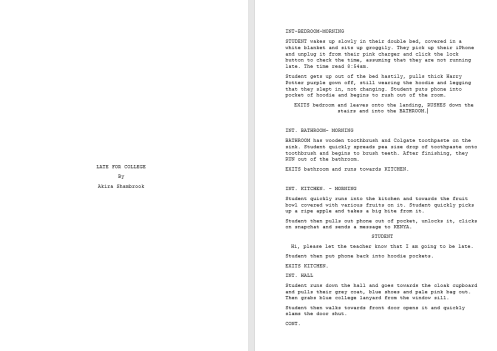
In the lesson today, we came up with an idea for a 2 minute short film. We then decided on the title ‘Late For College’. In which a student wakes up late for college and starts rushing around trying to get ready. During this story, they many obstacles while trying to get to college, but once they arrive they realise that it is a Saturday.

After deciding on this idea, we started writing a script for the piece.

script 1

script 2

Narrative Theory and Scrip Writing.

Narrative Theory

A story is a sequence of events in a specific order, whereas narrative is telling of these sequence of events.

Impact of Narratives- Stories and narratives give audiences diversion/escapism, to get away from their lives, personal identification so that they can relate to characters portrayed through the narrative, personal relationships and surveillance.

Story/ Narrative Theories-

Todorov- 5-point Narrative Structure- suggested every has a similar structural model:

  • Equilibrium – the ‘norm’ or status quo.
  • Disruption (Event) – something happens to disrupt the norm.
  • Realisation – the characters realise there’s a problem.
  • Repair – they attempt to fix the problem.
  • Resolution – the problem is fixed and the equilibrium is restored.

Claude Levi-Strauss- Binary opposites- said that all myths work in a similar way. To disrupt order on to a chaotic world, a myth may set up a binary opposition (opposing ideals in a narrative that create conflict and tension) but then resolve the narrative in a way which favours one over another; for example, good triumphing over evil or altruism over selfishness.

Oppositions can be visual or conceptual

  • Love/hate
  • Good/evil
  • Light/ darkness
  • Movement/ stillness
  • Control/ panic
  • Beauty/ ugliness
  • Law abiding/ criminal
  • Freedom/ imprisonment


Vladimir Propp- Functions and Characters:


  • The Hero: a character that seeks something, they drive the story and narrative. They can be either a quest narrative or a mystery/enigma
  • The Villain: who opposes or actively blocks the hero’s quest, they try to get in the hero’s way.
  • The Donor: who provides something to help the hero.
  • The Dispatcher: who sends the hero on his/her quest
  • The Helper: who aids the hero (a sidekick)
  • The Princess: the reward for the hero (this can be a person or an object)
  • The Father: an authority figure who rewards the hero for completing the journey
  • The False Hero: someone who appears good but is not (they betray the hero)

One character could perform a number of these functions, furthermore these functions can often be metaphorical instead of literal.

Joseph Campbell- Hero with 1000 Faces

For Vogler, the hero’s story is always a journey (whether it is internal or external). They leave the comfort of home to venture into a challenging, unfamiliar world.

Vogler-Campbell- Hero’s Journey

  1. Ordinary world
  2. The call to adventure
  3. Refusal of the call
  4. Meeting with the mentor
  5. Crossing the threshold
  6. Tests, allies and enemies
  7. Approach
  8. Ordeal
  9. Road back
  10. Resurrection
  11. Return with the elixir


Narrative Forms:

Linear is a chronological storyline, it is the most common, simple and organised. Linear avoids flashbacks and dreams, predictable/archetypal, genre: children, factual, children, classic. An example of a linear storyline would be ‘The Breakfast Club’ 1985. This movie follows a group of five teenagers who all end up in detention on a Saturday. Each one of these teenagers come from a different stereotypical high school group. For example, there is a princess, a basket case, a jock, a criminal and the brains. This movie becomes quite predictable as you can assume from the beginning that there will be some significant character development throughout the film.

Single strand– is one set storyline, it focuses on one person/ hero and their story. There are no groups/ teams, secondary characters allowed. ‘The Perks of Being a Wallflower’ follows the story of a shy, high school student who is struggling with depression. Throughout this movie, it follows Charlie’s (the main character) story and how his character develops throughout it. This movie shows how he makes connections with new people and how he eventually comes out of his shell. This type of narrative is perfect for this movie as it is just focuses on Charlie’s story and what he has been through, instead of focusing on other characters. This movie never switches character point of view which portrays the single strand element.

Nonlinear this is when there is no specific order to a storyline. It can be fractured, altered, intensified/ create a sense of instability. The whole truth is unknown and there is no chronological/less linear, back and forth in time and or characters POV. ‘The Haunting of Hill House’ 2018 is a good example of a nonlinear storyline. This storyline follows a family who, when they were younger, lived in a house that in the modern day became the most haunted house in America. Now that they are adults and have moved on, they are brought together in the face of a tragedy, they have to confront the ghosts of their past. Some of the ghosts still show in their present lives. The show often switches back and forth, showing the audience what happened in Hill House when they were children and then switches back to present day to show their adult lives.

Multi strand– this is when there are several storylines and different types of people. The story focuses on each character’s individuals propose to the moral, goof for sequels, series, documentaries the TV show, ‘Skins’ 2007-2009, focuses on the lives of a group of teenagers living in Bristol. It follows their two years of being in sixth form. Throughout this series it contains controversial themes such as substance abuse, sexuality, teenage pregnancy, personality and eating disorders, and mental illness. However, each episode is named after one of the character’s names, therefore meaning that that episode will be focusing on that one specific character and their story.

Narrative Types:

  • Flashback/ Recall
  • Realist
  • Anti- Realist/ Surrealist
  • Dramatic irony

Narrative Devices:

  • MacGuffin- something that has no narrative function whatsoever but it has a massive part in the storyline.
  • Flashback/flash-forward– skipping between different time periods during the storyline. A flashback showing you what has happened in the past and a flash-forward showing you what is happening in the future.
  • Foreshadowing– this subtly implies to audience what is to come.
  • Chekhov’s Gun-if something is introduced into the plot, it has to be functional and used in the storyline.
  • Poetic Justice-
  • Deus ex Machina- an unsolved problem that is solved with no explanation.

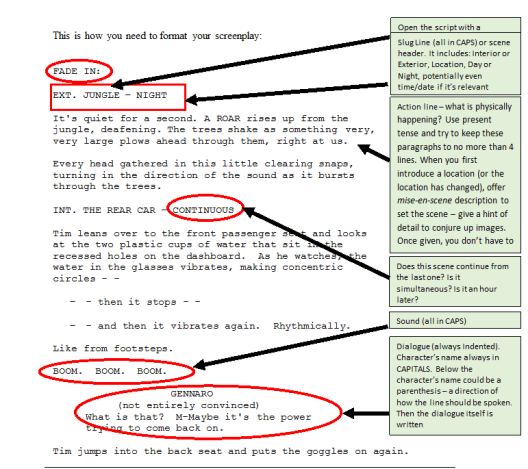
Script Writing- The script is the backbone to any media product. Without a script, the media text would not be supported. Script writing relies on the writer’s ability to produce clear structure.


Structure:
script

  • Font: The font of a script is always Courier (size 12).
  • Slug Lines: Each scene opens with a Slug Line. This is the introduction to the scene: Is it inside (INT.) or outside (EXT.)? Where is it located? Is it night or day? Is it continuous to the last scene or is it happening simultaneously? You should then number the scenes consecutively – this is a European/UK convention but it does not happen in America (so take them out if you sell your script to USA).
  • Action Lines: What is physically happening in this scene? Try to keep these brief but succinct – no longer than four lines for each paragraph. Paint a picture in the reader’s mind using as fewer words as possible.
  • Characters Names: These are in CAPITALS the first time we meet the character but lower case afterwards. When you first introduce a character, give a brief description to help establish their characterisation – just a couple of lines which outline their physical description
  • Sound: A noise is always in CAPITALS.
  • Dialogue: This is always indented and the speaker’s name is always in CAPITALS
  • Parenthesis: This is a brief note describing how the line of dialogue should be spoken. Use this sparingly – actors don’t like to be told how to do their job.


  • A page of script is a minute of screen time and they are often made up of three
  • Only write what the audience can see- do not write characters’ emotions or thoughts (unless it is a voice over) because this cannot be visualised.
  • A scene gives at least one piece of story information to the viewer. If no new information is revealed, then the scene is not needed.
  • Scripts have to be written concisely and economically- each word has to be used carefully. It is important to show and not tell.
 

Stages of Video Editing

Footage Assembly (Building a sequence)

Import footage into Adobe Premiere Pro and check through footage for usability, ensure the footage that is being used in the exact footage desired by re-watching everything that is being added in. Then bring all of the footage into a timeline, in order. To refine the sequence, cut the footage as necessary using the razor tool. Them the footage should be trimmed if necessary, using the red bracket tool. Create a sense of rhythm to your edit by ensuring it flows well and that there are no sudden cuts, it should all blend together, additionally, don’t have too much, if any ‘dead air’, this will also aid the flow of the film.

 Building a Soundtrack

Create a suitable ambience track for the entire scene. Then add dialogue using automated dialogue replacement. Then add some Foley sound effects and music if necessary. ‘L’ cuts and ‘J’ cuts should them be bridged and the volume should be mixed by using the sound levels. For example, if a particular audio file

Adding Titles

Use the title tool to create simple titles or use Adobe Effects to create animated titles. Adobe Effects can be used to create a title that is more unique.

Colour Correction Grading

  • Correct colour temperature (white balance). Blues can be used to create a colder, unhappy atmosphere and warm tones such as yellows or oranges can be used to create the opposite; a happy atmosphere. The contrast can also be changed using curves, however it is important to ensure that colour grading is subtle, because the footage will look too artificial otherwise.

Colour Correction and Colour Grading

Colour Correction

  • Colour correction is the process of manually changing such things as colour temperature, (also known as white balance) and exposure amongst other things. Because filming is never going to be perfect, this is a necessary stage, as it will make the end product of all the scenes look more professional.

However, it is usually considered that shooting flat will give more room to move in post-production. Shooting flat means having as little-in camera processing on the image when filming. An easy way to colour correct is to use the fast colour-correct effect in Adobe Premiere.

When colourists are editing a movie to get the perfect correction and colour, they watch it in a cinema while doing so to get an actual sense of what the audience would be seeing in a cinema. The colour correction technique has to be seamless, not different colours or saturation in each scene. Furthermore, they can make certain scenes that were shot in the evening look like it was shot in the afternoon or scenes that were shot earlier in the day, look like nighttime shot.  They also play the score/soundtrack while editing this to see if the colours match the mood of the music, for example, a happy, uplifting song would require warmer tones in the scene.

Colour grading refers to making further alterations after correction. This stage is not seen as correction mistakes, but more as adding style to the footage. By selecting the colour correction in Adobe Premiere, there is an option to use scopes and waveform that give a visual aid to the changes being made.

The Process

  1. Edit the footage into a sequence and remove any noise or artefacts that are not wanted in the footage.
  2. Correct the colour temperature (white balance).
  3. Adjust the blacks (shadows) and the lights.
  4. Adjust the mids (every colour but black and white) to make sure that things such as faces stand out. This can be done using the 3-way colour corrector effect.
  5. Add any appropriate filters, this is no longer correction, but instead grading.

Lookup Tables (LUTs)

LUT (Lookup Table) is essentially the modifier between two images, the original image and the displayed image, based on a mathematical formula. There are different types of LUTS – viewing, transform, calibration, 1D and 3D. The three colourists go into a lot of detail on all them.

Image result for lookup table  Related image

Adjustment Layers – Layers that will lie over the entire film (or entire sections) to alter on a larger scale. This can include such things:

  • Colour presets
  • Exposure presets
  • Film grain
  • Vignettes
  • Distortions

Creating a Soundtrack

Making a Sound Effects List

  • Make a list of all the sound effects, then these are to be recorded or obtain. Choose a soundproofed room to record in and find decent microphone to record the audio. Then, when editing, remove existing audio and unlink audio from video. Then delete any unwanted clips and add the ambience track or sound bed. Collect a series of background noises in the original audio and lower the volume to barely audible, then the sound effects need to be layered.

Automated Dialogue Replacement 

The dialogue that is going to be replaced needs to be written down, then multiple versions of this audio needs to be recorded. The video should be used for reference if possible.

Creating Foley

Similar to ADR, write down the exact sounds to be replaced and record multiple versions and use the video for reference.

Finding existing Foley

Write down the exact sound to be replaced, then original royalty free or copyright fee versions can be found and the SFX needs to be downloaded into a folder with the footage.

Music Soundtrack

a music track can be added at the end of the process, however only if the music will fit the scene, if not, music being used should be avoided, especially if the song is copyrighted, because it can be very expensive to buy a song. If this is not the case, copyright free music can be used.

Sound-bridging L and J cuts

L cut– when the audio from previous scene carries on into the next

J cut– when audio from upcoming scene starts in the previous scene

To sound bridge L and J cuts, unlink the audio and shorten either the video or the audio, depending on what type of cut is desired. The audio will now bridge the new video.


Mixing the audio

  1. Use the sound scope to the right of the timeline.
  2. Ambience should be barely audible.
  3. Dialogue should be in the green/ yellow.
  4. Background Foley should be in the green/yellow.
  5. Key Foley should be in yellow.

Foley Set-up

foley set up

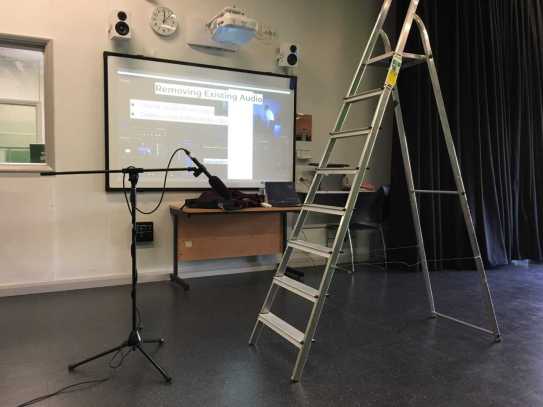
In class, we attempted Foley by using a shotgun microphone and a ladder. We used the ladder to create some audio. This gave us a taster of what creating Foley sound effects is like. Even though it can be quite enjoyable, it takes a lot of time, effort and editing. Therefore, in my own work, to save more time, I would focus more on gathering royalty free/ copyright free sound effects online.